Text messages
TwinNests can text parents when their co-parent asks for or answers a swap, and the evening before each handoff. Texts are optional and off until you turn them on.
How to turn texts on
- Sign in to the TwinNests app at twinnests.com/app (or the Android or iPhone app). Only parents can turn on texts.
- Go to the Family tab, then Connect, then Text messages.
- Type your US mobile number and pick which texts you want: swap alerts, handoff reminders, or both.
- Tick the consent box (it starts unticked) and tap Text me a code.
- Type the 6-digit code we text you. Nothing else is sent until you do.
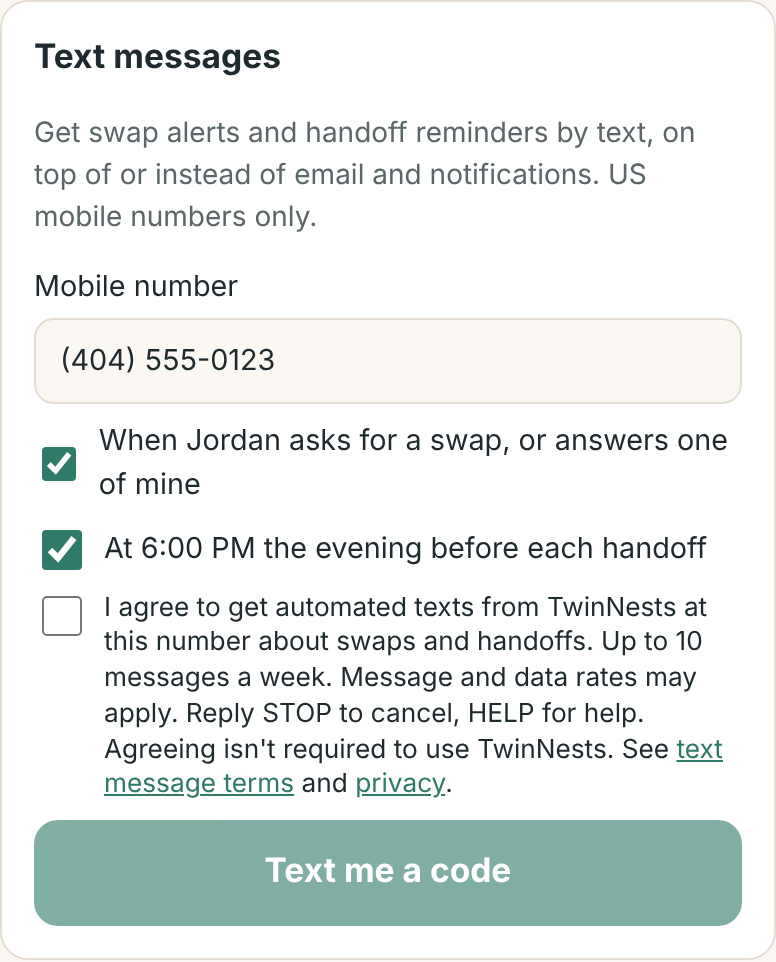
The consent box reads: "I agree to get automated texts from TwinNests at this number about swaps and handoffs. Up to 10 messages a week. Message and data rates may apply. Reply STOP to cancel, HELP for help. Agreeing isn't required to use TwinNests. See text message terms and privacy."
Text message terms
- Program: TwinNests family schedule alerts: swap requests and answers from your co-parent, and handoff reminders the evening before (6 pm your time).
- From: (888) 681-3890.
- How often: depends on your family's schedule, up to 10 messages a week.
- Cost: TwinNests doesn't charge for texts. Message and data rates from your carrier may apply.
- Stop any time: reply STOP to (888) 681-3890, or tap Stop texts and remove my number in the app. Reply START to turn them back on.
- Help: reply HELP, or email [email protected].
- Carriers aren't liable for delayed or undelivered messages. Texts are for US mobile numbers only.
- Consent to texts isn't a condition of using TwinNests or of any purchase. We never send marketing texts.
Your number
We use your mobile number only to send the texts you chose. We don't sell or share your number or your consent to texts with anyone for marketing, and mobile opt-in data is never shared with third parties. Texts go out through Telnyx, our text delivery provider. Remove your number in the app, or delete your account, and we delete it. More in our privacy page and our full Terms of Service.
Last updated November 7, 2026.